

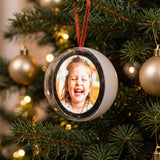

A video keepsake ornament is exactly what it sounds like: an ornament that plays your own family videos on the tree. The hardest part isn't the tech. It's choosing which moments to put on it.
This guide walks you through the whole thing, from digging through your camera roll to hanging the finished ornament. We use the Glowkeep Memory Orb™ as the example, a clear ornament with a round 480 × 480 screen inside, but most of the advice works for any video keepsake.
What you'll need
- A Memory Orb and its USB-C cable (included in the box).
- A computer with a USB port that accepts the cable.
- Your videos and photos, copied from your phone to the computer.
- A free video editor or online video resizer that can crop to a square.
Set aside an evening. Most of that time goes into picking clips, not loading them.
Step 1: Decide who it's for
Before you open your camera roll, decide who will look at this ornament every day. A grandparent wants the grandkids. A new mom wants the baby. A couple wants their story. A family remembering someone wants that person, as they were.
Knowing the audience makes the next step much faster, because you're no longer scrolling through four years of videos. You're looking for one person, one feeling.
Step 2: Pick the right clips
Good ornament clips have a few things in common:
- Short. Five to fifteen seconds is plenty. The orb loops, so short clips feel lively instead of slow.
- Faces close to the camera. The screen is small and round. Wide shots of a whole room get lost.
- Movement. Waving, laughing, spinning, blowing out candles. If a photo would tell the same story, use a photo.
- Good light. Daylight or a bright room. Dark clips look muddy on any small screen.
- Steady-ish. A little shake is charming. A lot is hard to watch on loop.
Make a folder on your computer and drop your favorites in as you find them. Aim for a handful of great clips rather than dozens of okay ones. You can always add more later.
Step 3: Crop each clip to a square, 480 × 480
The orb's screen is 480 × 480 pixels, so square videos fit it best. Phone videos are usually tall (vertical) or wide (horizontal), so they need a quick crop.
Most free video editors and online resizers can do this. Look for a "crop" or "resize" option, choose a square (1:1) shape, and set the export size to 480 × 480. Then:
- Center the frame on the faces. The screen is round, so anything in the corners of the square gets trimmed by the circle.
- Trim the start and end so the clip begins on the good part.
- Export the file and give it a name you'll recognize, like emma-first-steps.
Photos work too. Crop them to a square the same way, centered on the faces.
Step 4: Load the orb
- Connect the orb to your computer with the USB-C cable.
- It shows up like a USB drive. Open it.
- Drag your 480 × 480 files into the orb's folder.
- Wait for the copy to finish, then eject the drive and unplug.
That's it. Press the button and your clips play on loop. If something looks off, plug it back in and swap the file.
Step 5: Check it before you wrap it
Watch the whole loop once on the orb itself, not just on your computer. Small screens are honest. You might notice a clip that's too dark or a face that's cut off by the circle. Fix those now, while you still can.
Then charge it fully with the USB-C cable so it's ready the moment it's unwrapped.
Step 6: Give it, then hang it
The orb hangs on a branch with its ribbon. Pick a spot at eye level, near the front of the tree, where people stop and look. After the holidays, it can sit on a shelf, desk or nightstand for the rest of the year.
One small thing: be ready with your phone when they open it. The moment they recognize who's on the screen is usually the best part of the gift.
Ideas for what to put on it
- For grandparents: each grandchild saying "Merry Christmas" to the camera, plus a few everyday moments from the year.
- Baby's first Christmas: the first smile, first bath, first steps, first time touching snow.
- For couples: the proposal, the first dance, a favorite trip, the day you got the keys to your first place.
- In memory: a few clips of the person doing what they loved. Many families keep it simple: one wave, one laugh, one hug. Read more in our guide to meaningful memorial Christmas ornaments.
- For a pet lover: zoomies, a head tilt, the first day home.
Frequently asked questions
Do I need special software?
No special software for the orb itself. It shows up like a USB drive. You only need a basic video editor or online resizer to crop your clips to 480 × 480.
How many videos fit?
The orb has 4GB of built-in storage. How many clips fit depends on their length and file size. Short clips at 480 × 480 are small, so most people run out of favorite moments before they run out of space.
Can I change the videos later?
Yes. Plug it back in and replace the files any time. It's a nice tradition to refresh it every December.
What colors does it come in?
White or Black. White looks soft on a light tree; Black stands out on a dark green one.
Ready to make one? The Glowkeep Memory Orb™ ships free in the US, and you have 30 days to decide if it's right. For Christmas delivery, order by December 3.
